
Works seamlessly with your terminal, favorite IDEs, and AI coding agents
- Cursor
- Claude
- Windsurf
- VS Code
- Zed
- Antigravity
- Devin
- Cline
- GitHub Copilot
- ChatGPT
- Codex
- Google Gemini
- Google AI Studio
- DeepSeek
- Groq
- Grok
- Qwen
- OpenRouter
- ElevenLabs
CLI & Secret Injection
Inject secrets at runtime. Zero .env on disk.
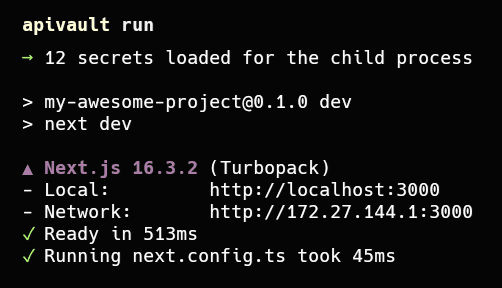
Run any framework or service with secrets injected directly into process memory. apivault run automatically cloaks local .env files while your app is running and restores them upon exit.
Credentials load directly into child process memory and never touch unencrypted storage or disk logs.
Local dotenv files are temporarily hidden during execution to prevent accidental git leaks.
Target Production, Staging, or Development seamlessly with a simple --env flag.
AI Agents & Remote MCP
Scoped, auditable key access for AI coding agents.
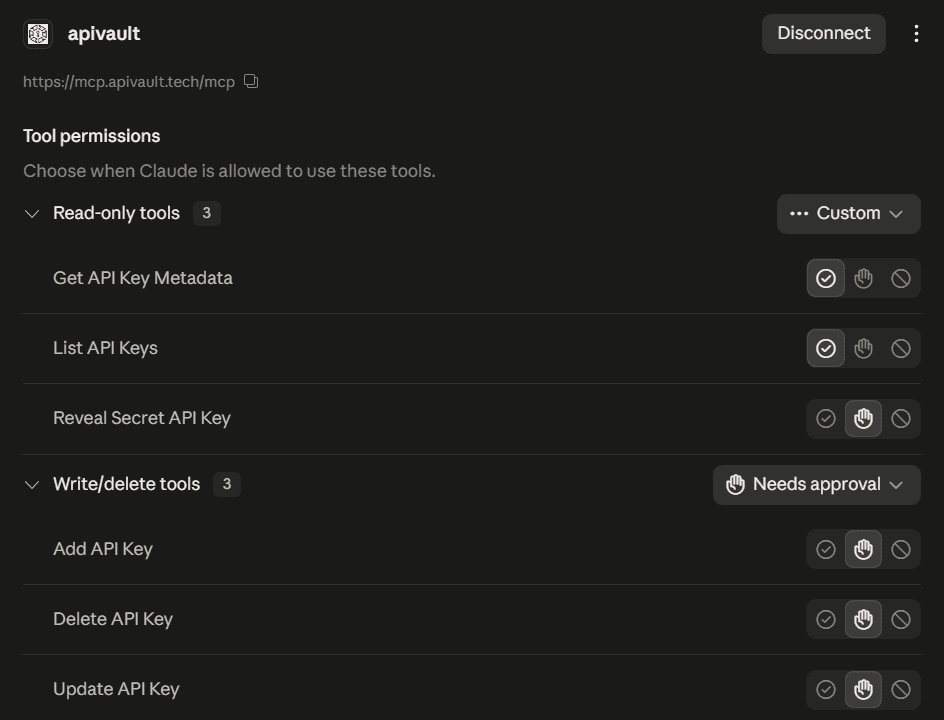
Connect Cursor, Claude Desktop, and Windsurf to your encrypted vault using Remote MCP with OAuth 2.0. Grant fine-grained read-only or write permissions per tool without ever pasting raw keys into chat history.
Grant granular tool permissions (read-only metadata vs. write/delete actions) with mandatory approval.
Pair agent environments directly via secure browser authorization without manual config file sync.
Audit active connections and revoke agent session tokens at any time directly from web settings.
Up and running in minutes
Create your vault
Sign up, enable WebAuthn passkeys/TOTP, and optionally set a custom encryption key.
Add or import keys
Store API keys by environment or bulk import existing .env files with one click.
Connect CLI & AI agents
Pair the CLI with apivault login or connect Cursor and Claude via Remote MCP OAuth.
Ship with confidence
apivault run --env Production -- npm start — secrets loaded in memory, never on disk.
Security by design, not by promise
Built for developers who actually read the security model. Read ours.
Encrypted at rest
Every secret is sealed with AES-256-GCM before it reaches the database.
Custom vault keys
Optional mode where your vault key is never stored — without it, secrets stay sealed.
Passkeys + 2FA
WebAuthn passkeys and TOTP two-factor on every account.
Session management
View and revoke active browser and CLI sessions anytime.
Browser CLI pairing
CLI auth via one-time browser approval — no passwords in terminal.
Masked by default
Keys show masked previews; full values only on explicit reveal.
Built for how you actually work
Solo developer
Replace scattered .env files with one encrypted vault. Run local apps with apivault run and never commit secrets again.
AI-assisted coding
Connect Cursor or Claude via MCP. Your agent gets the Stripe or OpenAI key it needs — scoped, revocable, never in chat history.
Multi-environment workflows
Separate Production, Staging, and Development keys. Switch environments with one flag: --env Production.
CI/CD pipelines
Give GitHub Actions, Docker, or Kubernetes a service token pinned to one environment, scoped to what the job needs, and set to expire.
Frequently asked questions
Everything about keys, encryption, and access.
Can ApiVault read my secrets?
Every secret is encrypted with AES-256-GCM before it is stored. In the default mode ApiVault manages the encryption key, so your signed-in session, CLI, or MCP token can decrypt. Switch on a custom vault key and ApiVault never stores it — every decrypt needs the key you supply. Encryption modes
What happens if I forget my custom vault key?
The secrets it protects cannot be decrypted — not by you and not by us. You can delete them and re-add them under a new key, so keep the vault key in a password manager.
Does apivault run touch my .env files?
Only temporarily. While your command runs, local dotenv files are renamed out of the way so your app reads vault secrets instead, then restored when it exits. Decrypted values are passed to the process as environment variables and never written to disk.
How much access does an AI agent get?
Only what you approve. Agents connect to the Remote MCP server through OAuth, and the consent screen lets you grant reading, revealing, and changing keys as separate scopes. Every connection can be revoked from settings. MCP scopes
Can I use it in CI/CD?
Yes. A service token belongs to a project rather than a person, can be pinned to one environment and an IP allowlist, and always expires — there is no “never” option. Service tokens